LISTEN TO KD RADIO link problems


Do you get this error message in Internet Explorer?
your computer security settings do not allow this file to be downloaded
If so, you must change the download settings
1. Open Internet Explorer.
2. Click Tools and then options.
3. Click on the security tab.
4. Select the Internet Zone.
5. Click on the Custom Level Button and then scroll down to Download.
6. Make sure to enable File download.
7. Click Apply and OK
8. Restart Internet Explorer
Do you get this error message in Internet Explorer?
Windows Media Player cannot find the specified file.
Be sure the path is typed correctly.
If it is, the file does not exist at the specified location,
or the computer where the file is stored is offline.
If so, it could mean:
1. You are listening from a business that has a firewall that blocks Windows Media Player files.
2. Your Windows Media Player is not configured to play .ASX audio files. You can correct this problem by following these simple instructions.
| Instructions |
| |
| 1. While Windows Media Player is open, close any error messages |
| 2. Click on "TOOLS" |
| 3. Click on "OPTIONS" |
| 4. Click on the "NETWORK" tab |
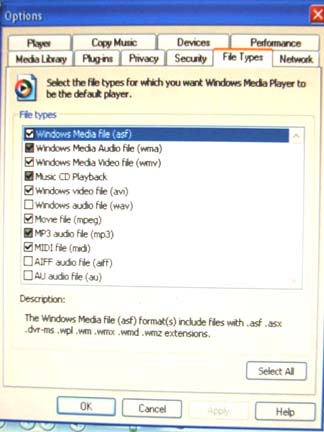
| 5. Click on the "FILE TYPES" tab |
| 6. Place a check in the box of the first item "WINDOWS MEDIA FILE (asf)" |
| 7. Click on "APPLY" |
| 8. Click on "OK" The window will close |
| 9. Click on this KD Radio LISTEN NOW link |
| |
 Back To Main Page Back To Main Page |
| |
|
| XP "Options" window |
| |
 |
|
| Instructions |
| |
| 1. While Windows Media Player is open, close any error messages |
| 2. Right Click the face of the player |
| 3. Click on " MORE OPTIONS" |
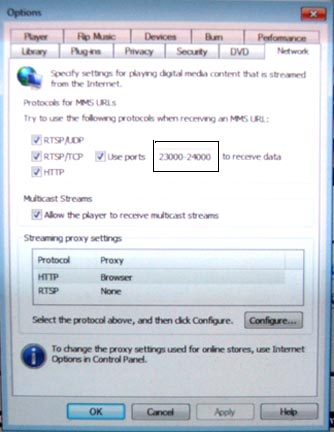
| 4. Click on the "NETWORK" tab |
| 5. Change "Use Ports" to 23000-24000 |
| 6. NOTE: If you want to keep the existing ports, use 7000-24000 |
| 7. Click on "APPLY" |
| 8. Click on "OK" The window will close |
| 9. Click on this KD Radio LISTEN NOW link |
| |
| Back To Main Page |
| |
|
| WINDOWS 7 "Options" window |
| |
 |
|
|